I have spent a lot of time on product teams. Not writing code — I want to be clear about that — but doing everything around it. Requirements, user stories, design collaboration, QA, release notes. Soup to nuts. The one important step I’ve never been able to do, though, is take something from a well-formed idea and make it an actual thing that exists. That step has always required someone else.
It doesn’t anymore, quite, and I’m still getting used to it.
Building Groundwork has been, in practice, an experience of being simultaneously the product manager, the designer, the QA team, and the client. When something comes out wrong, there’s no one to debrief with. It can only be your own fault. If you described it poorly, you got what you described. If you forgot to specify something, Claude made a decision without you, and Claude’s decisions, left unsupervised, tend toward whatever is fastest rather than whatever is best. The code underneath this tool appears to work, but I have no illusions that it’s elegant.
Good design involves friction — you have a direction, someone pushes back, the tension produces something better than either of you would have made alone. Claude doesn’t push back. It has no aesthetic instincts, no sense of what’s right for this audience or this tool, no opinion about whether a choice is working. All of that judgment lives entirely with you, which means you have to be able to articulate everything. For Groundwork, the sidebar alone took three full rounds before I landed on something that made any sense. I couldn’t figure out the difference between a step in a process, a living document, and a reference tool. They shouldn’t look the same or sit in the same place. Information architecture, it turns out, is something else I really didn’t know anything about. I figured it out using trial and error, which is to say slowly and with a non-zero amount of swearing.
Here’s what I actually built:
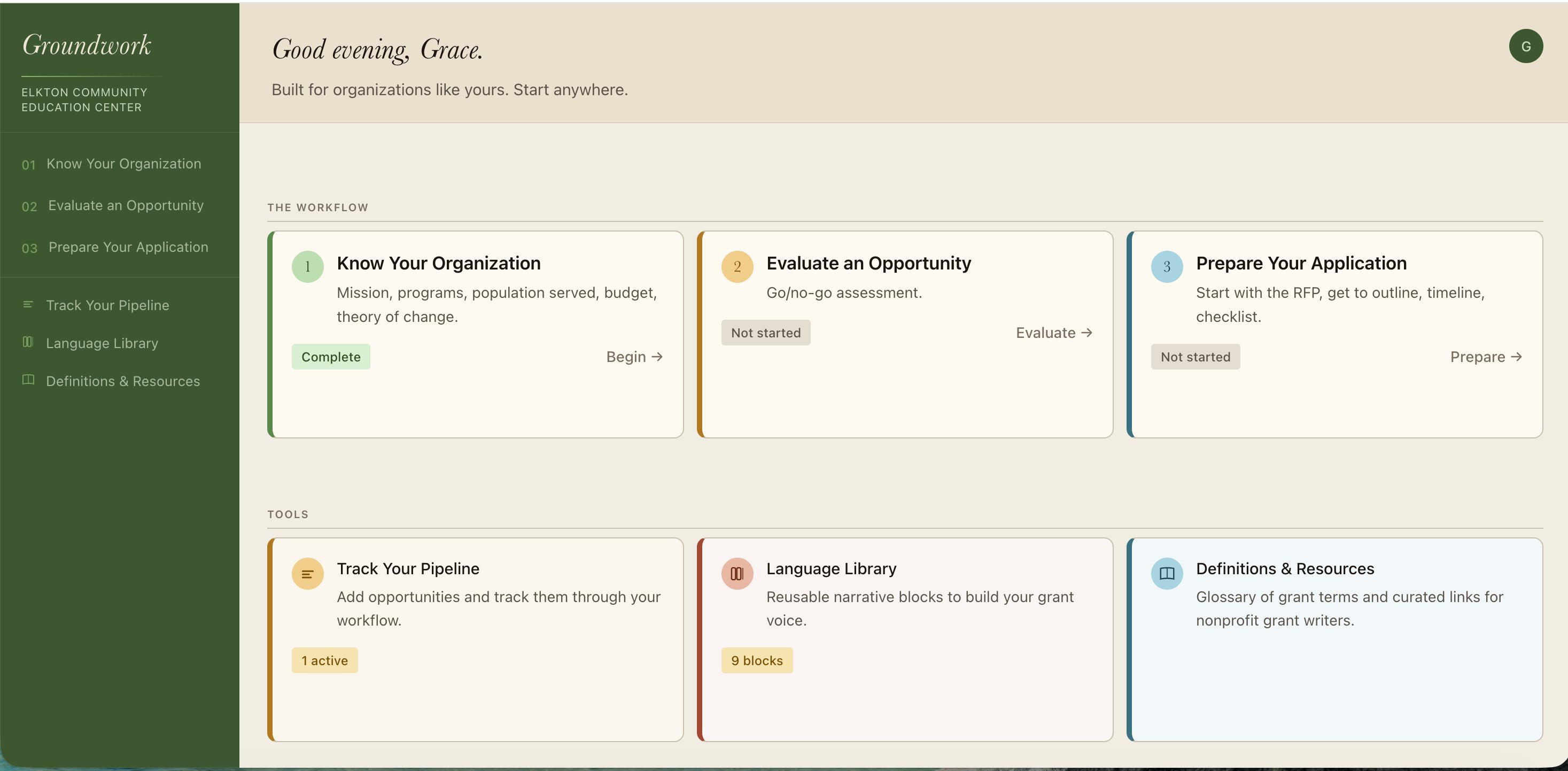
The first section asks you to document your organization: mission, programs, population served, budget, theory of change. This sounds like homework and is. Many small nonprofits do not have all of these elements, or have never pulled them together in one place. It’s also the foundation everything else draws on, which is why it’s first.
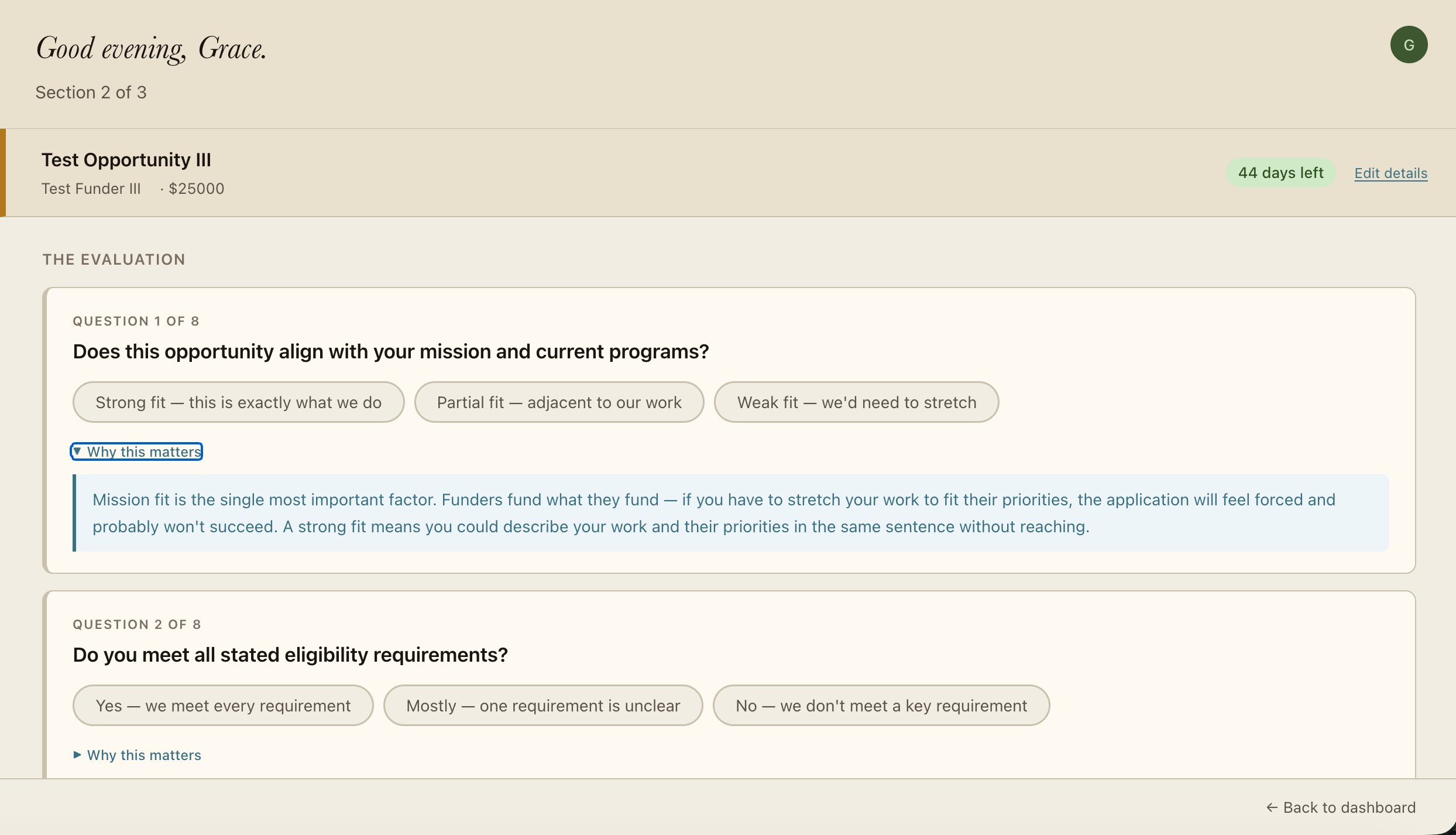
The second section is a go/no-go evaluator — eight questions about mission fit, eligibility, timeline, and capacity, each with a plain-language explanation of why it matters. The scoring engine produces a recommendation and a prose summary in board-memo format you can download and share. Two questions are hard stops: if your mission doesn’t fit or you don’t meet the eligibility requirements, the recommendation is to pass, regardless of how well you scored on everything else. Sometimes the most useful thing a tool can do is tell you not to bother, and most tools are too polite to do that.
The third section started as a checklist and became something considerably more interesting. You upload the grant RFP — or paste it in, or drop in the PDF — and the tool reads it and pulls out what matters: deadline, eligibility requirements, page limits, required attachments, evaluation criteria, proposal sections. From that, it generates a writing timeline mapped backward from the deadline and a document checklist. This is the section where AI stopped being just how I was building Groundwork and started being part of what I built.
Aside from the three steps, there are also three standing tools. The first, and the one I think most useful, is a language library where you can draft and store reusable narrative blocks — statement of need, program description, theory of change — with an AI assist that draws on your org profile to give you a first pass. The second is a grant pipeline that tracks every opportunity you’re considering, with status filters and deadline indicators and a button that carries a specific grant’s context through into the other sections so the tool always knows what you’re working on. Finally, there is a glossary of common terms and a curated resource list.
So far, building Groundwork has taken me approximately twenty-five hours across nine sessions. More iteration than I expected, more debugging than I’d like, and a few memorable moments of staring at a completely blank screen trying to figure out why something that worked yesterday did not work today. It has also been some of the most interesting thinking I’ve done in a while — about logic, about communication, about what makes a technology tool actually useful rather than just impressively feature-complete. That last question, it turns out, is much harder than it sounds.
I’ll let you know what the answer is after other people use it.